
Introduction
If you’ve ever set up a VoIP system and run into one-way audio, dropped calls, or failed SIP registrations, you’ve likely battled with NAT (Network Address Translation). NAT is essential in today’s networks, but it doesn’t play nicely with VoIP protocols like SIP and RTP, which were designed back when most devices had direct public IPs.
In this guide, we’ll break down the core conflict between NAT and VoIP, then show you how to troubleshoot and fix it with real-world tools. You’ll learn:
How NAT changes packets and why that disrupts SIP/RTP
Common VoIP symptoms caused by NAT (one-way audio, call drops)
Linux CLI commands for testing and debugging connectivity
Key Asterisk configuration options for NAT handling
Practical steps to troubleshoot and secure VoIP behind NAT
By the end, you’ll understand exactly why NAT causes VoIP headaches and how to solve them on Linux and Asterisk systems.
What is NAT in Networking?
Network Address Translation (NAT) is a process that changes IP addresses as packets pass through a router or firewall. Its main job is to let many devices on a private LAN share a single public IP address. This became essential because IPv4 addresses are limited and not every device can have its own public IP.
Common NAT Types
Static NAT: A fixed one-to-one mapping between a private IP and a public IP. Simple but rarely used in consumer setups.
Dynamic NAT: Private IPs are mapped to available public IPs from a pool, assigned on demand.
PAT (Port Address Translation): The most widely used form, often called NAT overload. Multiple devices share one public IP, and the router keeps track by assigning unique source port numbers. This is the default behavior on most home and office routers.
📌 Why this matters for VoIP:
Protocols like SIP and RTP often embed private IP addresses inside packet payloads. When NAT rewrites the headers but not the payload, mismatches occur leading to common VoIP issues like one-way audio or failed call setup.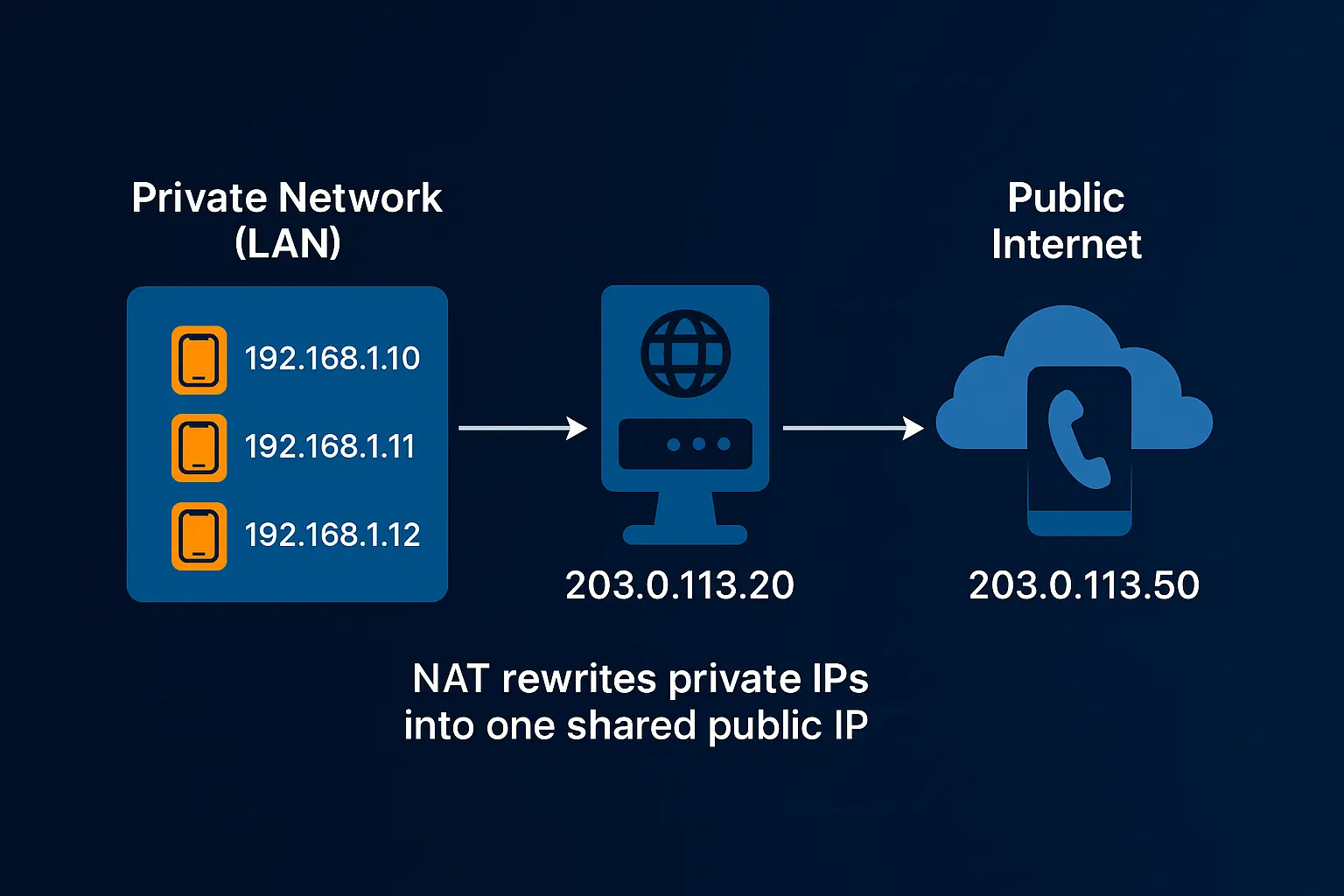
How NAT is Configured and Inspected on Linux
On Linux, NAT is handled by the netfilter framework inside the kernel, with tools like iptables or its modern replacement nftables used to configure and inspect rules.
Basic NAT Configuration (iptables)
The most common NAT setup is masquerading, which rewrites the source IP of outbound packets to match the server’s public IP:
# Enable IP forwarding
sudo sysctl -w net.ipv4.ip_forward=1

# Add masquerade rule (for outgoing traffic on eth0)
sudo iptables -t nat -A POSTROUTING -o eth0 -j MASQUERADE
This lets multiple private hosts behind the server share the same public IP.
Checking NAT Rules (iptables)
sudo iptables -t nat -L -n -vThis shows all NAT rules, including packet counters.
With nftables (modern alternative)
# List NAT table
sudo nft list ruleset

# Example masquerade rule
sudo nft add table ip nat
sudo nft add chain ip nat POSTROUTING { type nat hook postrouting priority 100; }
sudo nft add rule ip nat POSTROUTING oifname "eth0" masquerade
Inspecting Connections
To see NAT translations in action:
# View connection tracking table
sudo conntrack -L
You’ll see how private IPs and ports are mapped to public ones.
📌 VoIP relevance: When RTP streams (UDP) pass through NAT, these mappings matter. If ports aren’t forwarded correctly, Asterisk may see the wrong IP/port in SIP or RTP, leading to one-way audio or no call.
Why NAT Causes Problems for VoIP
Unlike web traffic, which follows a simple client-server model (HTTP requests always go out and come back on port 80/443), VoIP depends on two different protocols:
SIP (Signaling): Handles call setup, management, and teardown. Typically uses UDP/TCP on ports 5060 or 5061.
RTP (Media): Transports the actual audio or video. Uses a wide range of dynamic UDP ports (e.g., 10000–20000 in Asterisk).
The Core Problem
SIP isn’t just about IP headers, it embeds IP addresses inside the payload of SIP messages (e.g., Contact, Via, and SDP fields). NAT devices only rewrite the IP header, not these embedded addresses.
Result:
A SIP INVITE may list
192.168.1.100(private IP) as the contact address.The remote endpoint tries to send responses or RTP streams to that private IP, which is unreachable on the internet.
Outcome: calls fail to connect, or you get one-way audio (you can hear them, but they can’t hear you).
RTP Issues
RTP makes things worse because:
It uses ephemeral UDP ports chosen dynamically at call setup.
NAT often blocks or drops these if there’s no explicit port forwarding.
Even when signaling succeeds, audio can be lost or misrouted, leading to silence or dropped media.
📌 Bottom line: VoIP protocols were designed assuming public IPs and direct end-to-end connectivity. NAT breaks that assumption unless the VoIP server and clients are specifically configured to handle it.
Linux CLI: Real-Time SIP Inspection with sngrep
When troubleshooting NAT and VoIP issues, it helps to see SIP signaling as it happens. One of the best tools for this is sngrep, a terminal-based SIP message viewer.
Install sngrep
On Debian/Ubuntu:
sudo apt update
sudo apt install sngrep -y
On CentOS/RHEL:
sudo yum install epel-release -y
sudo yum install sngrep -y
Capture SIP Traffic in Real-Time
Run sngrep and listen on your SIP interface (often eth0):
sudo sngrep -i eth0You’ll see a live list of SIP dialogs (INVITE, REGISTER, BYE, etc).
Select a call to drill down into the actual SIP messages.
Why It’s Useful for NAT Troubleshooting
Check if SIP headers (
Via,Contact,SDP) are showing private IPs instead of your public IP.Verify if your Asterisk
externiporexternal_media_addresssettings are being applied correctly.Quickly confirm if SIP REGISTER requests from phones behind NAT are reaching the server.
📌 Pro Tip: Use the filter to focus on a single IP or port:
sudo sngrep port 5060
sudo sngrep host 203.0.113.50
This makes it easier to isolate NAT-related issues, like missing or mismatched addresses in the SIP payload.
NAT Types and VoIP Impact
Not all NAT works the same way. Different NAT behaviors directly affect how well SIP signaling and RTP streams flow across networks. Here’s a breakdown:
NAT Type | Description | VoIP Impact |
|---|---|---|
Full Cone NAT | Any external host can send packets to the internal host on the mapped port. | ✅ Best for VoIP — inbound traffic works easily |
Restricted Cone NAT | Only external hosts that the internal host has already sent packets to can reply. | ⚠ May block inbound calls or registrations |
Port-Restricted Cone NAT | Stricter: external host must reply from the same source IP and port. | ⚠ Often causes RTP one-way or no audio |
Symmetric NAT | Creates a unique mapping for each outbound connection (IP+port). | ❌ Worst for VoIP — breaks most NAT traversal |
📌 Why this matters:
With cone NAT types, SIP and RTP usually work with minor tweaks.
With symmetric NAT, even STUN may fail, so you often need TURN servers or proper SBCs (Session Border Controllers) to make calls reliable.
Detecting NAT Type with STUN on Linux
Since NAT behavior can vary widely, it’s useful to know what kind of NAT you’re dealing with. The most common way to detect this is by using a STUN (Session Traversal Utilities for NAT) client. STUN servers reflect back your public IP and port information, helping you see how your NAT is mapping connections.
Install a STUN Client
On Debian/Ubuntu:
sudo apt update
sudo apt install stun-client -y
Run a Basic STUN Test
stun stun.l.google.com:19302This sends a STUN request to Google’s public STUN server. Example output might look like:
Binding test: success
Mapped address: 203.0.113.25:54321
Interpreting Results
If the mapped address is your public IP and the same port every time → likely Full Cone or Restricted Cone NAT.
If the mapped port changes each time you connect to a new host → you’re behind Symmetric NAT, which is problematic for VoIP.
Why It Matters for VoIP
Cone NATs usually work fine with Asterisk when
externipandlocalnetare set correctly.Symmetric NAT often breaks SIP/RTP unless you use TURN servers or a proper SBC (Session Border Controller).
NAT Traversal Techniques for VoIP
Because NAT and VoIP don’t naturally fit together, several techniques exist to make calls work reliably across networks:
STUN (Session Traversal Utilities for NAT):
Lets a SIP client discover its public IP and port.
Works well with cone NAT types but fails with symmetric NAT.
Commonly used in softphones and WebRTC.
TURN (Traversal Using Relays around NAT):
Relays audio/video streams through a public server when direct peer-to-peer fails.
Essential for restrictive NATs and firewalls.
Increases latency since media takes a detour.
ICE (Interactive Connectivity Establishment):
Tries multiple paths (direct, STUN, TURN) and picks the best option automatically.
Widely used in WebRTC and modern SIP clients — see STUN, TURN and ICE explained.
Provides the most robust NAT traversal in mixed environments.
SIP ALG (Application Layer Gateway):
A router feature that tries to rewrite SIP headers on the fly.
In theory, it fixes NAT issues — but in practice, it’s often buggy and breaks calls.
Best practice: disable SIP ALG unless you know it’s working correctly.
📌 Takeaway: For VoIP admins, STUN is useful but limited, TURN adds reliability at the cost of performance, and ICE is the modern standard. SIP ALG, however, usually causes more harm than good.
Configuring Asterisk Behind NAT
Proper Asterisk config is essential. Example pjsip.conf snippet for NAT:
[transport-udp]
type=transport
bind=0.0.0.0
local_net=192.168.1.0/24
external_media_address=203.0.113.25
external_signaling_address=203.0.113.25

[1001]
type=endpoint
context=from-internal
disallow=all
allow=ulaw
auth=auth1001
aors=1001
direct_media=no
rtp_symmetric=yes
force_rport=yes
rewrite_contact=yes
Key parameters:
rtp_symmetric=yes: Ensures RTP replies go to the source IP/port.force_rport=yes: Forces replies to the same port, aiding NAT traversal.rewrite_contact=yes: Rewrites SIP Contact header with the public IP.
Verify transport config via Asterisk CLI:
asterisk -rx "pjsip show transport udp" Real-World Troubleshooting Tips
Common symptoms and quick fixes:
One-way audio: Likely RTP blocked. Open/forward UDP ports 10000-20000 on the firewall (see RTP ports and firewall configuration, and the no-audio troubleshooting guide).
sudo iptables -A INPUT -p udp --dport 10000:20000 -j ACCEPTCall drops after ~30 sec: NAT timeout. Enable SIP session timers or set
qualify=yesin Asterisk to send keepalive OPTIONS.Phones not registering: Disable SIP ALG on router to avoid packet corruption.
Example on Cisco router:
no ip nat service sip tcp port 5060 no ip nat service sip udp port 5060Multiple phones behind NAT: Use
rtp_symmetricandrewrite_contactto ensure correct RTP delivery.
Capturing RTP with tcpdump
To confirm RTP media flow, use tcpdump for ports 10000-20000:
sudo tcpdump -n udp portrange 10000-20000Continuous UDP packets indicate RTP flow; sparse or no packets suggest filtering or misrouting issues.
The Future: IPv6 and NAT-Free VoIP
IPv6 promises to eliminate NAT by providing globally unique IPs for every device, enabling true peer-to-peer calls without NAT traversal headaches. While IPv6 adoption grows, IPv4 with NAT remains dominant, making NAT mastery essential today.
Conclusion
NAT was built to stretch the IPv4 address space, not to support real-time communication. That’s why it often clashes with VoIP protocols like SIP and RTP, causing one-way audio, call drops, and failed registrations.
For VoIP admins, the key to solving these problems is:
Understanding different NAT types and how they affect calls
Using Linux CLI tools like sngrep and tcpdump to see what’s really happening
Configuring VoIP servers such as Asterisk with the right NAT settings
By mastering these, you can deliver stable, high-quality VoIP even in NAT-heavy networks and be well-prepared for the smoother world of IPv6 when it finally takes over.
Related guides
FAQ (Quick Answers)
Q: Why does NAT break VoIP?
A: Because SIP messages often include private IPs in headers, and RTP streams rely on dynamic UDP ports. NAT rewrites packet headers but not these embedded addresses, making endpoints unreachable.
Q: Should I disable SIP ALG?
A: In most cases, yes. SIP ALG is meant to fix NAT issues but is usually buggy and causes dropped calls or registration failures. Best practice: disable it.
Q: Can VoIP work without NAT?
A: Yes. With public IPv4 addresses or IPv6, NAT isn’t needed. Direct connectivity avoids many VoIP problems.
Q: What’s the best fix for NAT in VoIP?
A: Combine proper server configuration (e.g., rtp_symmetric, rewrite_contact in Asterisk) with client-side traversal methods like STUN, TURN, or ICE.